PTZ, Iris, and Focus Controls
This section contains topics about controls that are available on the PTZ page:
Some features described in this section are not available on all cameras. The selection of features and the appearance of the interface may vary between camera models. Unless stated otherwise, figures and feature descriptions in this section describe the interface as it appears for Ross Video PTZ-12G+, PTZ-12G, and PTZ-NDI cameras . For information about controls for other camera types, refer to the user manuals for those cameras.
To access the PTZ page:
-
Tap the PTZ button.

If a message about enabling joystick control appears, click the Enable Joystick Control button.
The PTZ page appears (Figure ??).
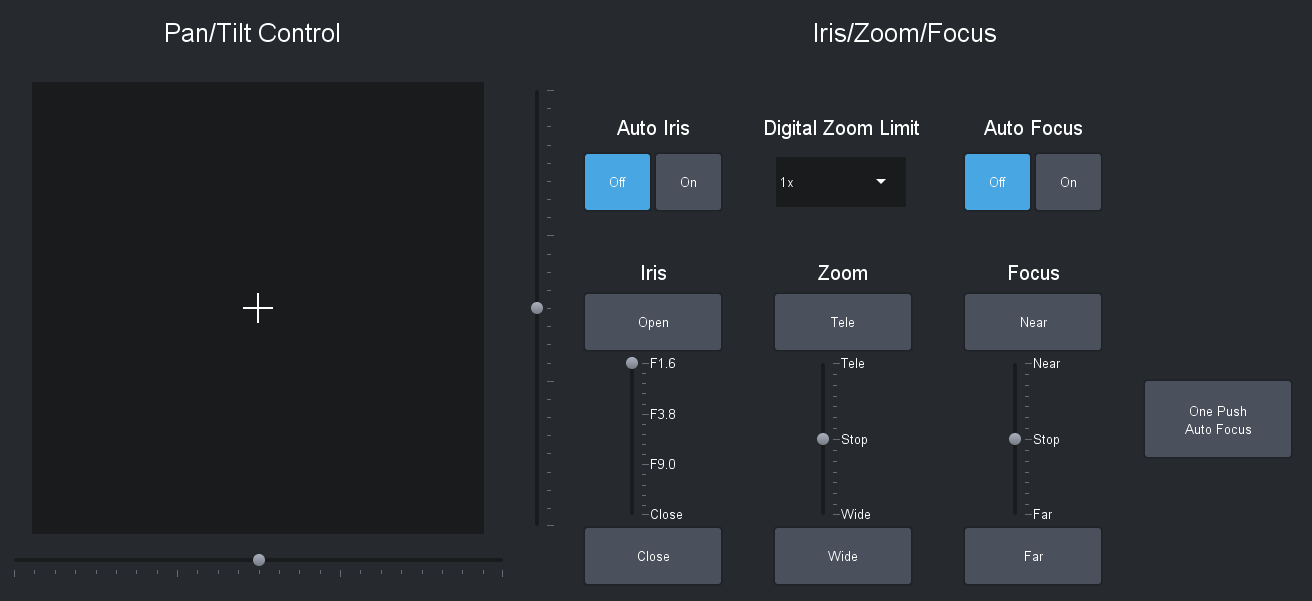
Figure 1 - Pan/Tilt controls and Iris/Zoom/Focus controls
Pan/Tilt Controls

Figure 2 - Pan/Tilt controls
To pan and/or tilt the camera, do one of the following:
- Tap and drag the cross-hairs away from center. The farther the cross-hairs are from center, the faster the camera moves.
- Tap and drag either the pan slider or the tilt slider away from center. The farther the slider handle is from center, the faster the camera moves.
Zoom Controls
This section describes zoom controls as they appear for PTZ-12G+, PTZ-12G, and PTZ-NDI cameras. Zoom controls vary by camera model. Some do not have digital zoom controls. Others have an On/Off setting for digital zoom.

Figure 3 - Zoom controls
To adjust the Digital Zoom Limit (maximum zoom value):
- Tap the Digital Zoom Limit drop down menu.
- Select the zoom limit (1x to 12x ).
To adjust the Zoom setting, do one of the following:
-
Tap and drag the Zoom slider handle upwards to zoom in (telephoto), or downwards to zoom out (wide). The farther the Zoom slider handle is from center, the faster the lens zooms.
-
Tap and hold the Tele button or the Wide button.
tipTo adjust the zoom rate, go to the Config > Operation > Joystick area, and then adjust Zoom Tele/Wide Button Sensitivity .
Iris Controls

Figure 4 - Iris Controls
To turn on Auto Iris:
- Tap Auto Iris > On .
The Iris controls for the Sony ILME-FR7 are velocity based (just as the Zoom and Focus controls are).
To adjust the iris manually:
-
Tap Auto Iris > Off , and then do one of the following:
-
On the Iris slider, tap either Open or Close . The iris moves one step with each tap.
-
Tap and drag the Iris slider handle upwards to open the iris, or downwards to close it.
tipTo adjust the Iris Open/Close Sensitivity on Sony ILME-FR7, BRC-AM7, and Panasonic PTZ cameras, go to the Config> Operation > Joystick area, and then adjust Iris Open/Close Button Sensitivity .
-
Focus Controls
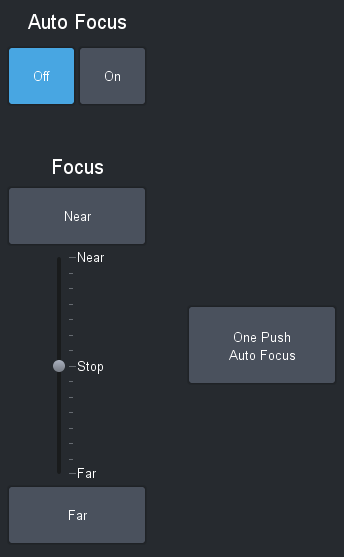
Figure 5 - Focus controls
To turn on Auto Focus:
- Tap Auto Focus > On .
To automatically focus the lens once:
- Tap Auto Focu s > Off , and then tap the One Push Auto Focus button.
To adjust focus manually:
-
Tap Auto Focus > Off , and then do one of the following:
-
Tap and drag the Focus slider handle upwards (Near ), or downwards (Far ). The farther the Focus slider handle is from center, the faster the lens focuses.
-
Tap and hold the Near button or the Far button.
tipTo adjust the focus rate, go the Config > Operation > Joystick area, and then adjust Focus Near/Far Button Sensitivity .
-