Paint Controls
This section contains topics about controls that are available on the Paint page:
Some features described in this section are not available on all cameras. The selection of features and the appearance of the interface may vary between camera models. Unless stated otherwise, figures and feature descriptions in this section describe the interface as it appears for Ross Video PTZ Cameras . For information about paint controls for other camera brands, refer to the user manuals for those cameras.
To access the Paint page, tap the Paint button.
Exposure Controls
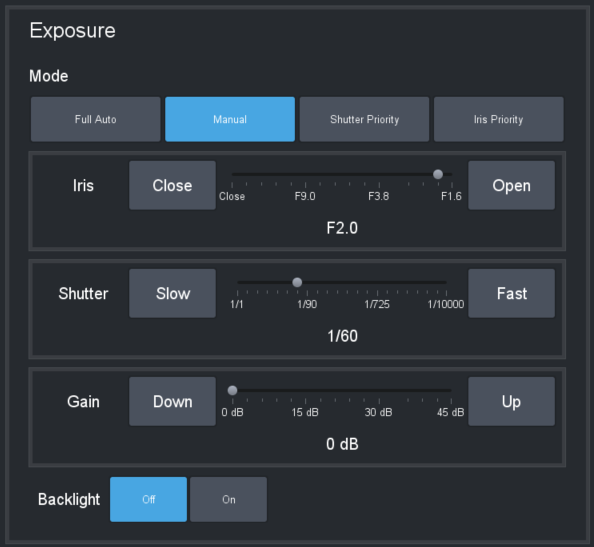
Figure 1 - Exposure controls for PTZ Cameras
Mode Buttons
- Full Auto — The exposure settings are automatic. Manual adjustment is not available.
- Manual — You can manually adjust Iris , Shutter , and Gain settings. To adjust exposure settings, either tap and drag the appropriate slider handle, or tap the buttons at the ends of the slider.
- Shutter Priority — You can manually adjust the Shutter . The Iris and Gain settings are automatic.
- Iris Priority — You can manually adjust the Iris . The Shutter and Gain settings are automatic.
Backlight Button
When the backlight setting is On , automatic exposure settings assume the subject is backlit, and adjust accordingly. Backlight mode is available only when Full Auto Exposure is enabled.
For the Sony ILME-FR7 and BRC-AM7 camera, settings such as Iris, Shutter, and Gain through Visca are either unavailable or limited. The following controls are:
- ›Iris— Auto On/Off and Open/Close increments
- ›Shutter— Auto On/Off only
- ›Gain— Auto On/Off only
The extended ND Filter controls are also available.
Color Controls
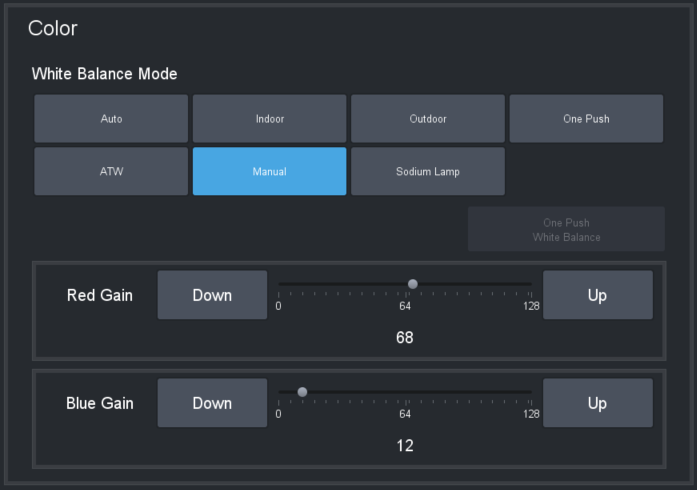
Figure 2 - Color Controls
Tap a button to select a White Balance Mode :
- In Manual mode, you can adjust Red Gain and Blue Gain manually.
- For most modes, the Red Gain and Blue Gain sliders adjust to predetermined positions automatically.
- One Push mode makes the One Push White Balance button available.
- On Panasonic cameras, AWB A mode or AWB B mode makes the Trigger AWB button available.
Open On-Screen Menu Button
The Open On-Screen Menu button (Figure ??) opens the Menu Control page, which enables you to adjust camera settings using the on-screen menu. For more information, see “On-Screen Menu”.
Figure 3 - - The Open On-Screen Menu button