In-Desk Mounting
The Acuity® control panel can be mounted in a desk either on an angle, or flat.

To Mount the Control Panel on an Angle
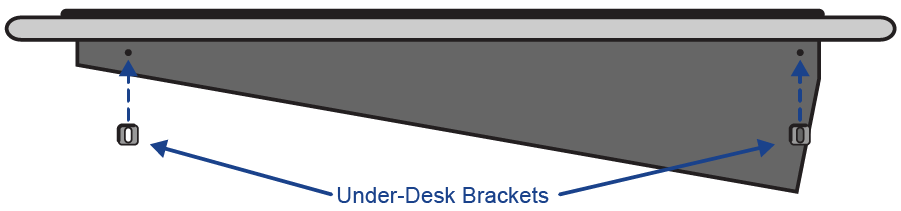
The Acuity® control panel ships with the desk supports installed to allow it to be installed in a desk and sit at the same angle as it would be sitting on the desk.
Note:
Contact Ross Video technical support for scale drawing of the your control panel to allow for the most precise measurements for
cutting the hole in your desk.
Note:
The desk must be between 0.65" and 1.7" thick to properly mount and secure the control panel.
-
Install the under-desk brackets (4800FR-613-01) to secure the control panel in the desk.
To Mount the Control Panel Flat
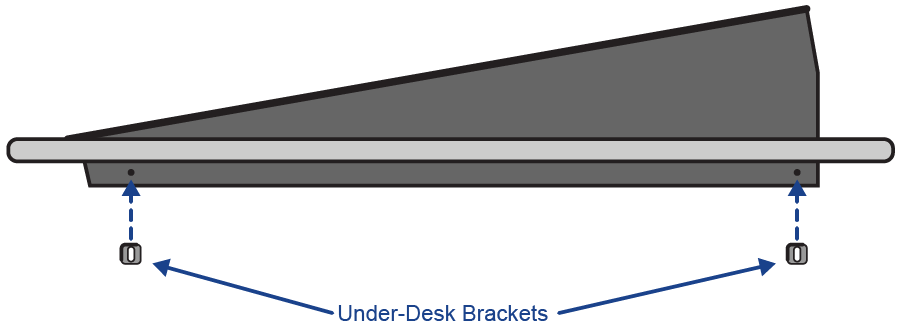
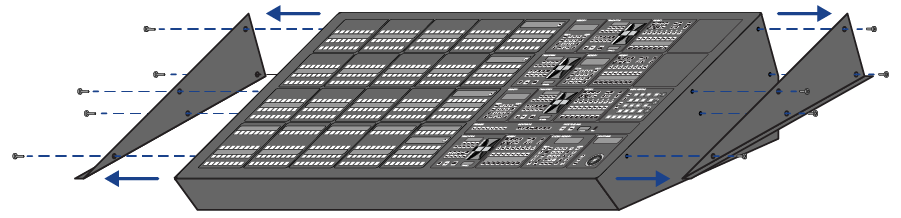
Remove the desk supports that come installed on the Acuity® control panel to allow it to be installed in a desk so it sits flat.
Note:
Contact Ross Video technical support for scale drawing of the your control panel to allow for the most precise measurements for
cutting the hole in your desk.
Note:
The desk must be between 0.65" and 1.7" thick to properly mount and secure the control panel.
-
Remove the desk supports from either side of the control panel.
-
Install the under-desk brackets (4800FR-613-01) to secure the control panel in the desk.