
To Set up the Quick Listen Device
The quick listen allows you to listen to a pre-mix input on a selected output.
Tip:
Press and hold the Listen button for an input to route that input signal to the selected Quick Listen Device output.
-
Click Quick Listen Device and select the outputs you want to use for the listen device. XLR-Analog-Output shown.
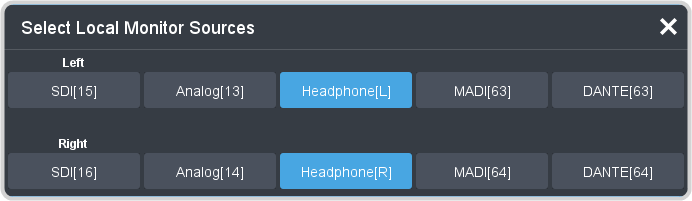
Important:The Quick Listen feature will temporarily override the audio signal on the selected outputs. Ensure that the outputs are available before assigning them as the Quick Listen device.Note:Audio inputs are automatically grouped into Left and Right stereo pairs. For each stereo pair, the lower number is assigned to the Left channel and the higher number is assigned to the right channel. For example, for inputs 5 and 6, channel 5 is assigned as the Left channel and 6 as the Right channel.- SDI [15/16] — signals are embedded on channels 15 and 16 of the SDI output.
- Analog [13/14] (XLR-Analog-Output only) — signals are inserted on analog outputs 13 and 14.
- Headphones [L/R] (XLR-Analog-Output only) — signals are inserted on the Headphones output.
- MADI [63/64] — signals are inserted on MADI outputs 63 and 64.
- DANTE [63/64] — signals are inserted on Dante® outputs 63 and 64.