DashBoard Control
The PTZ Camera Control Plugin is a DashBoard plugin application that enables you to configure and control supported PTZ cameras, including PTZ-12G & PTZ-NDI Cameras . You can control cameras manually, store and recall presets, and configure camera settings. The PTZ Camera Control Plugin is included as part of Ross Video DashBoard.
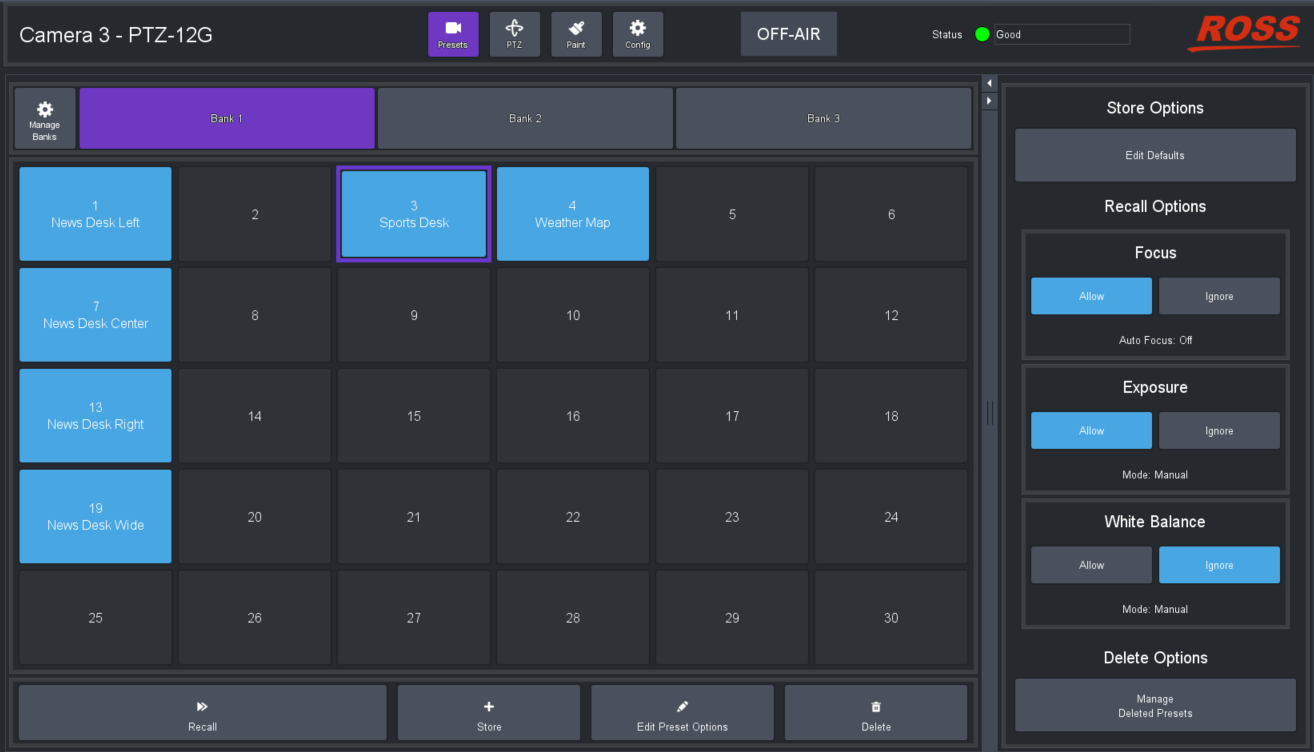
Figure 1 - DashBoard PTZ Control Plugin
To control PTZ-12G & PTZ-NDI Cameras , the control protocol of the camera must be set to VISCA (not Pelco D ). In the web interface, the Protocol setting is at Maintenance > System Service > Protocol . For more information, see “Maintenance: System Service Page”.
For optimal control of your PTZ cameras, you can add an off-the-shelf USB joystick (or other game controller) to DashBoard. A USB controller enables you to perform pan/tilt/zoom movements with a joystick, and select a different camera at the push of a button.
For more information about the PTZ Camera Control Plugin, see the User Manual for PTZ Camera Control Plugin (8351DR-015) .
Ross Video DashBoard, the DashBoard User Guide (8351DR-004) , and the User Manual for PTZ Camera Control Plugin (8351DR-015) . are all available as free downloads from the Ross Video website at www.rossvideo.com/dashboard. To control PTZ-12G & PTZ-NDI Cameras , DashBoard v9.2.2 (or higher) is required.