
To Set the Default Mnemonic Appearance for TouchDrive Panels
- Press HOME > Setup > Personality > Standard Mnemonics > TouchDrive Mnemonics.
-
In the Default areas press the button for the type of mnemonic displays you want to set the default for.
- Standard Mnemonics — default mnemonic color and font size for video sources.
- CC Bank Mnemonics — default mnemonic color and font size for custom control banks.
- Memory Bank Mnemonics — default mnemonic color and font size for memory banks.
- AUX Mnemonics — default mnemonic color and font size for aux buses.
-
Press Font and select the size and layout of the font you want to use on the mnemonic displays.
Tip: Select Standard to use the standard mnemonic settings.
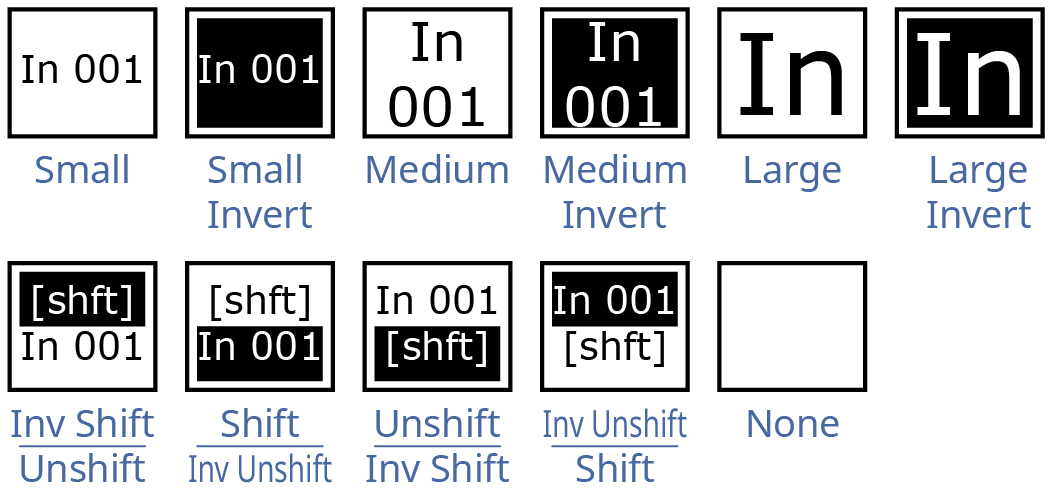
-
Press Background or Foreground and select the color you want to apply to that component of the mnemonics.
- Acuity Colors — use a standard Acuity® mnemonics color.
- ME Colors — use a ME Glow color.
- User Colors — use a User Color.
- TouchDrive Colors — use a standard TouchDrive mnemonics color.
Tip: Select Standard under Acuity Colors to use the standard mnemonic color.Tip: Select None to not use a color for the mnemonic. - Use the Xpt Mode knob to select whether the mnemonic show just the source name (1 Name), or the source name and shifted source name (2 Names).
- Press HOME > Confirm.