
Default X-TOUCH MINI Mapping
The default mapping comes from the map and layer files that are included on the Product Resources disk.
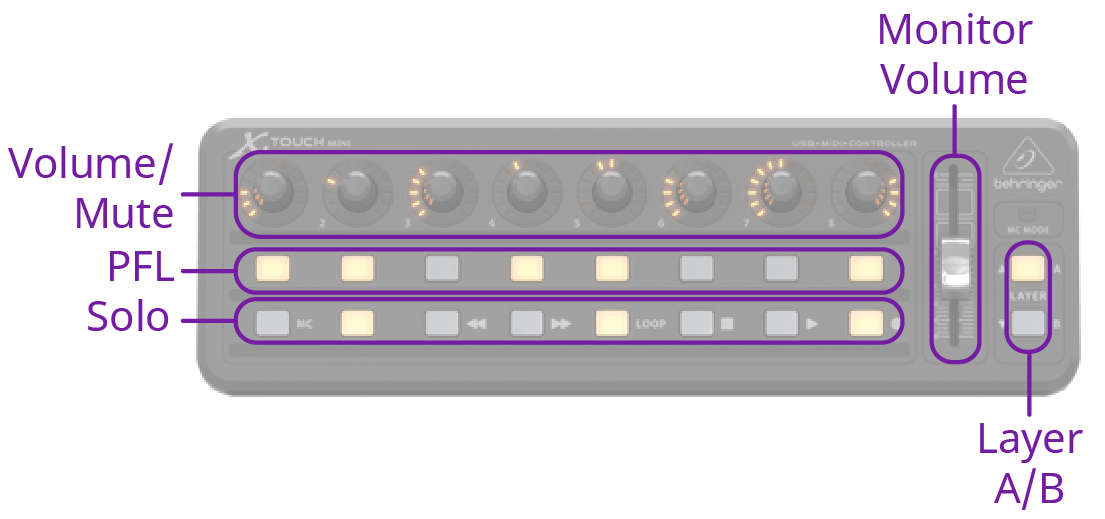
- The encoder knobs turn to control the volume, or audio level, and are pushed to mute that channel.
- The fader controls the level of the Monitor output.
Encoder Knob Mapping
The encoders are mapped differently on the A and B layer.
| Fader | Layer A | Layer B |
|---|---|---|
| 1 | Audio 1 | Audio 9 |
| 2 | Audio 2 | Audio 10 |
| 3 | Audio 3 | Audio 11 |
| 4 | Audio 4 | Audio 12 |
| 5 | Audio 5 | Audio 13 |
| 6 | Audio 6 | Audio 14 |
| 7 | Audio 7 | Audio 15 |
| 8 | Audio 8 | Audio 16 |
Note:
The default assignment is based on the default fader configuration. If you change what is assigned to any of the assignable encoders (Audio X) used on the
default map, the audio sources those encoders control also changes. For example, if you assign Audio 5 to SDI 5, the stripe on the midi panel will control SDI 5 audio.