
15.0 Features
TouchDrive Support
Support has been added for the TouchDrive control panels.
RCP Mnemonic Names Setup
As of version 15.0 you don't need to set up a separate RCP Label device on the switcher. The mnemonic labels are automatically uploaded with the RCP Control connection.
CC Banks on Acuity® Double-Down Panels Rows
You can now assign the keyer rows on the Double-Down Acuity® panels to custom controls.
- Press the SEL button (mnemonic button on the Double-Down) on the panel row you want to set the key bus assignment for.
- Press Select CC Bank.
- Press the button for the custom control bank (BANK X) that you want to assign to the bus or row.
Tip: Select different Setbuttons to show more CC Bank options.
RossTalk Updates
The following command has been added or updated.
- USERVAR ALLVAR:? — Return all user variables.
The ME sources selection has been expanded for the hardware you are using.
Possible ME Sources (ME) for Acuity®
- Preview — ME:ME number:PV
- Program A/B — ME:ME number:PGM: (selects PGMA or PGMB depending on what is selected on the panel)
- Program A — ME:ME number:PGM:A
- Program B — ME:ME number:PGM:B
- Program C — ME:ME number:PGM:C
- Program D — ME:ME number:PGM:D
- Program E — ME:ME number:PGM:E
- Program F — ME:ME number:PGM:F
Possible ME Sources (ME) for Ultrix Acuity
- Preview — ME:ME number:PV
- Program A — ME:ME number:PGM
- Program B — ME:ME number:PGMB
- Program C — ME:ME number:PGMC
- Program D — ME:ME number:PGMD
- Program E — ME:ME number:PGME
- Program F — ME:ME number:PGMF
Add Media-Store ID to File Name
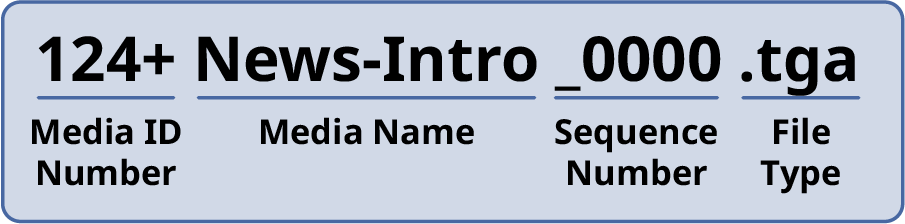
You can add a media id number to the beginning of the file name by using the + symbol as a separator. For example 124+Intro.tga appears in the Media-Store folder as Intro with the media id number 124. The same applies to animation sequences.
CC Logic On-Air Status
Four new tests have been added to CC Visual Logic to test if a bus is on-air or on-preview.
- ==(A) — if X and Y buses are both on-air return true.
- ==(P) — if X and Y buses are both on-preview return true.
- !=(A) — if X or Y (only one) buses are on-air return true.
- !=(P) — if X or Y (only one) buses are on-preview return true.