The Notification Center saves system notifications sent to you from the Quorum Server. You can use the Notification Center to view and mange system notifications.
To view system notifications
1.In the Main toolbar, click the  icon. A badge on the
  icon indicates the number of new notifications that you have not read.
The Notification Center opens displaying the available notifications.
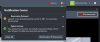
2.To clear a notification from the Notification Center, click the X associated with the notification to clear.
3.To clear all of the notifications from the Notification Center, click Clear.