The layout of the Quorum user interface consists of the side navigation and several types of panels (Figure 3.2). When you launch Quorum for the first time, it opens with the side navigation and a blank area to add panels.
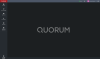
Figure 3.1 First Login Quorum UI
Which panels to include in the user interface is up to you. After adding the panels you need for your particular workflow, you can rearrange and resize them.
¬Since the layout of Quorum user interface can vary according to your requirements, the images of the Quorum user interface in this guide are for demonstrative purposes only.
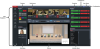
Figure 3.2 - Quorum User Interface Example