 Configuration icon.
Add a DataLinq Server to a Local Inception Server
The DataLinq Server software runs on Ross XPression systems or on other computer systems to gather data from external sources. Before you add a DataLinq Server connection to your Inception Server, you will need the hostname or IP address of the DataLinq Server computer and the port number that it uses to output data.
When using an Inception Cloud Service, DataLinq Servers are configured on your Ross Cloud Gateway.
To add a new DataLinq Server to a local Inception Server
1.Log in to your Inception Server as an Inception administrator.
For information about Inception Server log in, refer to the procedure To access the Inception Server Configuration window.
2.On the main toolbar, click the Configuration icon.
The Configuration window opens.
3.On the Configuration window toolbar, click the  DataLinq icon.
The DataLinq Servers tab opens.
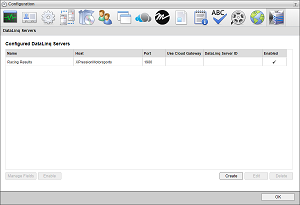
4.Click Create.
The Create DataLinq Server page opens.
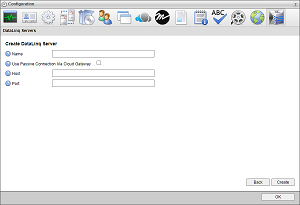
5.In the Name box, enter a name for the DataLinq Server.
6.In the Host box, enter the hostname or IP address of the DataLinq Server.
7.In the Port box, enter the port number that the DataLinq Server uses to communicate with your Inception Server.
8.Click Save.
Inception adds the new DataLinq Server to the Configured DataLinq Servers list.