 Editorial icon.
Enable Assignment Notification via E-mail
An assignment editor can use the Assignment Manager to assign stories to reporters. With assignment notifications via email enabled, the Assignment Manager can send notification e-mails to the Inception users assigned to an assignment.
Ross Video recommends creating a dedicated e-mail account with a descriptive name and e-mail address to send assignment notification e-mails. Assignment users will see the sending e-mail address when they receive a notification e-mail.
The e-mail account used for assignment notification via e-mail must be different from the ones used for story creation or story approval.
Before you can configure assignment notification via e-mail you must create an account for the e-mail address that sends out assignment notifications. To create an e-mail account for assignment notification via email, refer to the section E-mail Account Configuration.
To enable assignment notification via email
1.On the Configuration window toolbar, click the Editorial icon.
The Editorial panel opens.
2.Click the Assignment Manager tab.
The Assignment Manager tab opens.
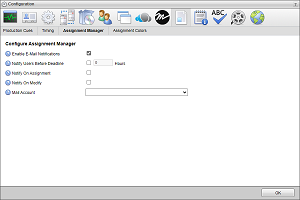
3.Select the Enable E-Mail Notifications check box to enable the Assignment Manager to send assignment notification e-mails to the users assigned to an assignment.
The times in the assignment notifications sent to assignees are displayed in the assignee’s local time zone.
4.Select the Notify Users Before Deadline check box to send an assignment notification e-mail to the assignee before the assignment deadline.
5.In the Hours box, enter the number of hours before the assignment deadline to send an assignment notification to the assignee.
6.Select the Notify On Assignment check box to send a notification e-mail to the assigning Inception user when the assignee receives an assignment from the Assignment Manager.
7.Select the Notify On Modify check box to send a notification e-mail to the assigning Inception user when the assignee updates their assignment.
To manually send notifications by clicking the Notify icon in the Assignment Manager Grid view or Assignment Editor tool bar you must clear the Notify Users Before Deadline, Notify On Assignment, and Notify On Modify check boxes.
8.Use the Mail Account list to select the e-mail account that the Assignment Manager uses to send assignment notification e-mails to the users assigned to an assignment.
This list only contains the e-mail accounts defined on your Inception Server.
The e-mail account used for assignment notification via e-mail must be different from the ones used for story creation or story approval.
9.Click OK to close the Configuration window.
For More Information on...
•how to create an e-mail account, refer to the section E-mail Account Configuration.